


Muse from Meta
4.718.68K Reviews
App Specs
- Version
- 13.0.0.4.159
- Updated On
- License
- Free
- Downloads
- 5,000,000+
- Developer
- Meta Platforms, Inc.
- Categories
- Productivity
- Platform
- Android
Screenshots







 Analysis by AppCompare
I approach AI assistants as practical tools, not as magic. The useful test is whether one can make an ordinary task easier without adding more work than it saves. Muse from Meta is presented as a personal AI agent, and that framing makes it worth considering for people who want help with everyday productivity. My main reservation is also clear from the outset: a broad promise is not the same as a dependable workflow, so it helps to know what you expect an assistant to do before making it part of your routine.
What free access means in practice
I start with the cost question because “free” is useful only when I know what it does—and does not—tell me. Muse has a free entry point, alongside optional in-app purchases, so I’d treat trying it and paying for anything as separate decisions. That distinction frames the next question: what kind of everyday help could make the app worth keeping?
A free starting point, with paid items to consider
Muse is a free productivity app from Meta Platforms, Inc. Its in-app purchases range from $0.99 to $199.99 per item, so “free” describes the cost of getting started, not a guarantee that every possible purchase or use will cost nothing. I would install it without treating that as a commitment to spend: first decide whether it helps with a task you actually have, then consider any paid option only if its purpose and price make sense to you.
That distinction matters because the available purchase range is wide. It is not enough, by itself, to tell you what a particular item provides or whether you would need it. I would avoid assuming that a higher-priced purchase is necessary for ordinary use, or that every useful capability is included at no cost. Before buying anything, check the in-app description and ask whether the benefit solves a recurring problem rather than a one-off curiosity.
The practical value question is therefore not simply “Is it free?” It is “Can I get enough useful help without paying, and do I understand what a paid item adds before choosing it?” That is a sensible way to approach any assistant with optional purchases. If you prefer apps with a clearly fixed, all-inclusive price and no in-app purchasing, Muse may feel less straightforward until you have checked the purchase details for yourself.
How the audience signal should guide expectations
Muse has a 4.7 average from around 62,000 ratings, with roughly 10,000 written reviews, and has passed 1 million installs. Those figures suggest that many people have tried it and that ratings are generally strong, but they are not a substitute for testing whether its style suits your needs. AI tools can feel very different depending on the questions you ask and the kind of output you expect.
The app is rated Teen, which is useful context for households deciding whether it belongs on a younger person’s device. I would still treat the age label as a starting point rather than a replacement for family judgment: the right choice depends on how the person plans to use an AI assistant and what guidance they have around online tools.
Worth Reading Before You Choose

EA SPORTS FC Mobile 26 Is a Bigger Football Game, but It Takes Time

Flipboard Shows What News Apps Must Do Beyond the Feed

Switching to Android Auto Means Rethinking Your Driving Routine

Google Calendar Makes a Crowded Week Easier to Manage

Ludo King Makes the Most of the Minutes Between Plans

Baby Panda World Brings Quick Play to Modern Phones, but Its Game Library Feels Busy
Where an AI assistant can earn its place
For me, an AI assistant earns space on a phone when it helps turn a fuzzy intention into a next step, without pretending to replace my judgment. I’d look for value in small tasks where a first draft or a clearer structure can get me moving. The tradeoff is that conversational help still takes review and sometimes follow-up, which matters before I rely on it.
Useful for shaping a task, not just answering a question
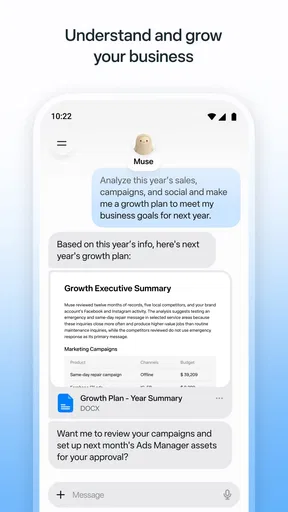
The strongest reason to try Muse is the possibility of using one assistant as a place to think through small, loosely defined tasks. Instead of opening a search engine for information, a notes app for a rough plan, and a writing tool to clean it up, you can begin by explaining what you are trying to accomplish in ordinary language. That can be especially handy when you know the goal but have not yet worked out the steps.
For example, imagine you have a free hour after work and need to prepare for a meeting the next morning. You could use an assistant to turn a messy set of thoughts into a short preparation checklist, then review and correct it yourself. The value is not that the app knows your responsibilities better than you do; it is that a prompt can give you a first draft to react to. If you already have a clear checklist, a plain notes app may be faster.
A less obvious way to get better results is to include the constraints that make the answer usable. Rather than asking for “a plan,” say what you need to finish, how much time you have, and what format would help you act on it. Then check the result for missing steps and assumptions. This small habit can make an AI response easier to use, while also keeping you in charge of the decisions.
Make it a drafting partner, not the final authority
For writing-related chores, the most practical role is often revision rather than authorship. A short prompt can ask for a clearer version of a message, a more orderly outline, or a concise summary of points you have already gathered. I would keep personal details out of a draft unless they are needed, and I would read every suggested change before using it. A smoother sentence can still alter the meaning or sound unlike you.
One useful workflow is to ask for two alternatives with different tones, then combine only the parts that feel natural. That gives you a comparison to work from instead of accepting a single answer as definitive. It is particularly helpful for a delicate note, where the goal is to sound clear without being abrupt. For anything consequential, though, your own judgment—and, where appropriate, a human reviewer—should remain the final check.
This is also where expectations need to stay grounded. Muse’s short store description identifies it as “Muse from Meta,” and its summary presents it as a personal AI agent, but those broad descriptions do not establish that it will handle every kind of planning, research, or writing equally well. I would start with low-stakes tasks and judge the quality of its responses in the specific situations that matter to me.
A small prompt habit that saves cleanup
When an answer comes back too broad, resist the urge to start over with a completely different request. Follow up with a concrete correction: ask for fewer steps, a shorter response, or a format you can copy into your own notes. Then compare the revised answer against the original task. This is a more useful test of an assistant than judging it on one vague question, because real work often takes a little back-and-forth.
There is a tradeoff, however: refining prompts takes attention. If your task is faster to complete directly, asking an AI to organize it can become extra work. I would use Muse when I am stuck, facing a blank page, or trying to turn several ideas into a structure—not as an obligatory stop before every message or decision.
Tradeoffs that matter before relying on it
I find the main tradeoffs are less about whether an assistant can produce an answer and more about whether that answer is dependable enough for the task. With Muse, I’d keep sensitive details to a minimum and verify anything consequential, while remembering that a calendar, notes app, or authoritative source may be better for specific jobs. Those distinctions help identify who is most likely to benefit.
Convenience versus verification
An assistant can produce confident-sounding text that still needs checking. That matters most when an answer includes specific claims, instructions, or details that affect another person. I would use Muse to generate a starting point, not to replace checking important facts against a trusted source. For a simple brainstorming session, this limitation is easy to manage; for high-stakes work, it can erase the time saved.
There is a related tradeoff with personal information. Any time you consider putting private details into an AI tool, pause and decide whether the task can be described in a less revealing way. You can often replace names, identifying details, or sensitive context with general labels and still get useful help with structure or wording. That is a practical precaution, not a reason to assume a particular policy or setting.
Another friction point is fit. People who want a predictable, fixed workflow may prefer a conventional task manager, calendar, or notes app. Those tools are often better when the main need is to record an item and find it later. An AI assistant is more appealing when you need help interpreting a loose request, exploring options, or shaping a draft. The two types of app solve different problems, even when both can support productivity.
Where alternatives are the better choice
If you mainly need reliable reminders and a visible schedule, choose a dedicated organizer that makes those items easy to scan and manage. If you need to preserve exact notes, use a note-taking app as your source of truth. If you need a fact that must be current or authoritative, consult the original source rather than relying on an assistant’s summary. Muse is most compelling as a flexible thinking aid; it is not automatically the best replacement for tools designed around records, deadlines, or verification.
I would also skip it if you dislike conversational interfaces or do not want to spend time refining prompts. A direct search or a familiar text editor can be quicker when you already know what you need. Similarly, if you expect an AI agent to complete important work without your review, the central tradeoff may be unacceptable: convenience comes with a responsibility to inspect the output.
Compatibility and a sensible first test
The current version is 10.0.0.17.160, and the minimum operating-system requirement is version 10. Before installing, check that your device meets that requirement. I would then test the app on a harmless, familiar task—such as turning a few non-sensitive ideas into an outline—and compare the result with the time it would take to do the same thing myself.
That first test should answer a few useful questions: Does the response make a task clearer? Can you guide it when the first answer misses the mark? Does the result need so much correction that a simpler tool would be better? Those answers are more relevant to your decision than a general claim that an assistant is useful for everyone.
Who is most likely to get value from Muse
I’d expect the best fit to be someone who often has a half-formed plan, a blank page, or several ideas to organize—and who is comfortable checking the result. Someone who wants fixed records, dependable reminders, or unreviewed answers may get more from a purpose-built alternative. With that in mind, the final decision comes down to whether Muse saves effort in a task you actually repeat.
Good fit for people who need a starting point
I can see Muse helping students who want to organize their own study topics into a review outline, busy workers who need a first draft of a routine message, or anyone who often has ideas but struggles to arrange them. The common thread is not a particular profession; it is having a task that benefits from structure while still being simple enough for you to check the result.
It may also suit someone who already experiments with AI and wants a productivity-focused app to try without paying upfront. The free entry point makes it reasonable to explore, while the available in-app purchases make it worth checking costs carefully before spending. I would treat the first few sessions as an evaluation rather than assume that continued use or a purchase is necessary.
Not ideal for every kind of productivity
Muse is a weaker match for people who need a dependable database of personal records, strict task tracking, or answers that can be used without review. Those needs call for tools with clearer structure or direct access to authoritative information. It is also a poor choice if optional purchases make you uncomfortable and you do not want to inspect what they cover, or if you prefer to keep AI out of your everyday workflow.
Meta Platforms, Inc. is the developer, and the app sits in a category where convenience can be tempting enough to encourage overuse. My advice is to give it a narrow job at first. If it consistently helps with that job, expand your use; if it adds steps, keep your existing tool instead. A productivity app earns a place by reducing friction in your own routine, not by having an impressive-sounding role.
My verdict: try it carefully, then judge the value
I would recommend giving Muse a measured trial if you want an AI assistant for planning, organizing thoughts, or producing drafts that you are willing to review. Its free starting point lowers the barrier to testing that fit, while the in-app purchase range means I would check each paid option rather than treating the app as wholly cost-free. The rating and install figures make it a widely tried choice, but your own results should decide whether it deserves regular use.
My practical recommendation is to choose one low-risk task, give the assistant clear constraints, and check whether its answer genuinely saves time. Keep a conventional calendar or notes app for anything you need to track reliably, and verify consequential claims elsewhere. If Muse helps you move from an unclear idea to an actionable first draft, it can be a useful addition. If you need certainty, fixed organization, or work you can accept without checking, I would choose a more specialized tool—or simply do the task directly.
Pros
- Quickly create short videos from photos and clips.
- AI editing tools can simplify making polished content.
- Designed for sharing videos on Meta platforms.
- A simple interface makes basic editing easy to learn.
- Useful for creators who want to experiment with AI video.
Cons
- AI-generated results may not match your prompt exactly.
- Some features may require a compatible device or account.
- Processing can take time
- especially for longer projects.
- Access to tools and features may vary by region.
- Uploading media may raise privacy concerns for some users.
FAQs for Muse from Meta
What is Muse from Meta?
Muse is Meta’s AI assistant, designed to answer questions, help with everyday tasks, and generate ideas through a conversational interface. Depending on where you access it, Muse may also work alongside Meta services and features. Its capabilities and availability can change over time, so check the app’s current description and in-product information to confirm what is offered in your region before downloading.
Is Muse from Meta free to use?
Access to Muse may be free, but availability, usage limits, and included features can depend on the version of the app, your location, and Meta’s current policies. Some features may require an account or may be introduced gradually. Review the listing and any pricing or subscription details shown before installing, and check the app for limits or terms that could affect how often you can use it.
Does Muse from Meta require a Meta account?
Some ways of using Meta’s AI services may require signing in with a Meta account, while requirements can vary by platform, region, and feature. You may also be asked to provide permissions or connect other Meta services to access particular functions. Before proceeding, review the sign-in screen and permission requests, and make sure you are comfortable with the account and data settings required for the experience you want.
How does Muse from Meta handle privacy and personal information?
As with other AI assistants, information you enter may be processed to provide answers and improve or operate the service, subject to Meta’s applicable policies and settings. Avoid sharing passwords, financial details, sensitive personal information, or anything you would not want handled by an online service. Read the privacy information available in the app and review account controls, because data practices and options can vary by feature and location.
Can I rely on Muse from Meta for accurate answers?
Muse can be useful for explanations, brainstorming, and everyday questions, but AI-generated responses can be incomplete, outdated, or confidently incorrect. Treat important answers as a starting point rather than a substitute for professional advice or reliable sources. Verify information involving health, legal matters, finances, safety, or current events, and remember that the assistant’s capabilities may differ depending on the prompt, region, and version you use.


